Chapter 5: Selection & Interfaces
Component selection criteria and interface specifications
5.1 Next-Generation Firewall (NGFW) Selection
Selecting the appropriate NGFW is critical for establishing effective network boundary protection. The selection process must consider performance requirements, feature sets, scalability, and total cost of ownership.
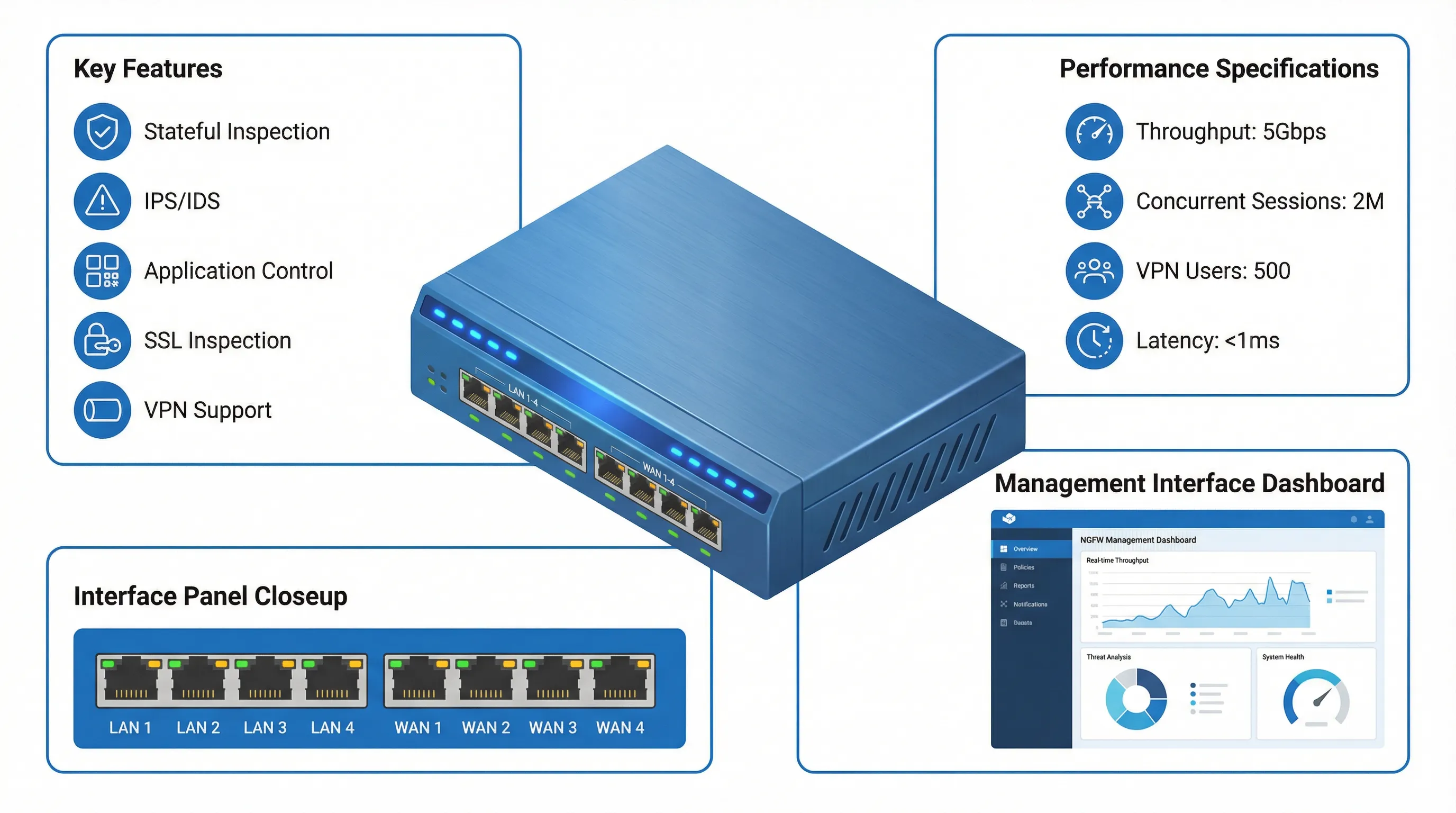
Key Selection Criteria
| Criterion | Considerations | Recommended Specifications |
|---|---|---|
| Throughput | Firewall, IPS, AV, SSL inspection throughput | 30-50% headroom above peak traffic |
| Concurrent Sessions | Maximum simultaneous connections | Minimum 500K for SMB, 2M+ for enterprise |
| New Sessions/sec | Connection establishment rate | Minimum 10K/sec for typical workloads |
| VPN Capacity | Concurrent VPN users and throughput | Based on remote workforce size |
| Interface Types | Copper, fiber, SFP/SFP+ options | Match existing infrastructure |
| High Availability | Active-passive or active-active clustering | Required for business-critical environments |
Feature Requirements
- Stateful Inspection: Track connection state and enforce policies based on session context
- Intrusion Prevention (IPS): Signature-based and anomaly-based threat detection and blocking
- Application Control: Identify and control applications regardless of port or protocol
- SSL/TLS Inspection: Decrypt and inspect encrypted traffic for hidden threats
- VPN Support: IPsec and SSL VPN for secure remote access
- URL Filtering: Block access to malicious or inappropriate websites
- Antivirus/Anti-malware: Scan files and traffic for known malware signatures
- Sandboxing: Detonate suspicious files in isolated environment for analysis
Vendor Evaluation
Evaluate vendors based on product performance, feature completeness, management interface usability, support quality, and total cost of ownership. Request proof-of-concept (POC) testing in your environment with realistic traffic patterns. Review third-party test results from organizations like NSS Labs, Gartner, and Forrester. Consider vendor financial stability and product roadmap to ensure long-term viability.
5.2 Interface Configuration and Logical Design
Proper interface configuration is essential for effective traffic segmentation and security policy enforcement. Logical interface design maps physical ports to security zones and defines traffic flow patterns.
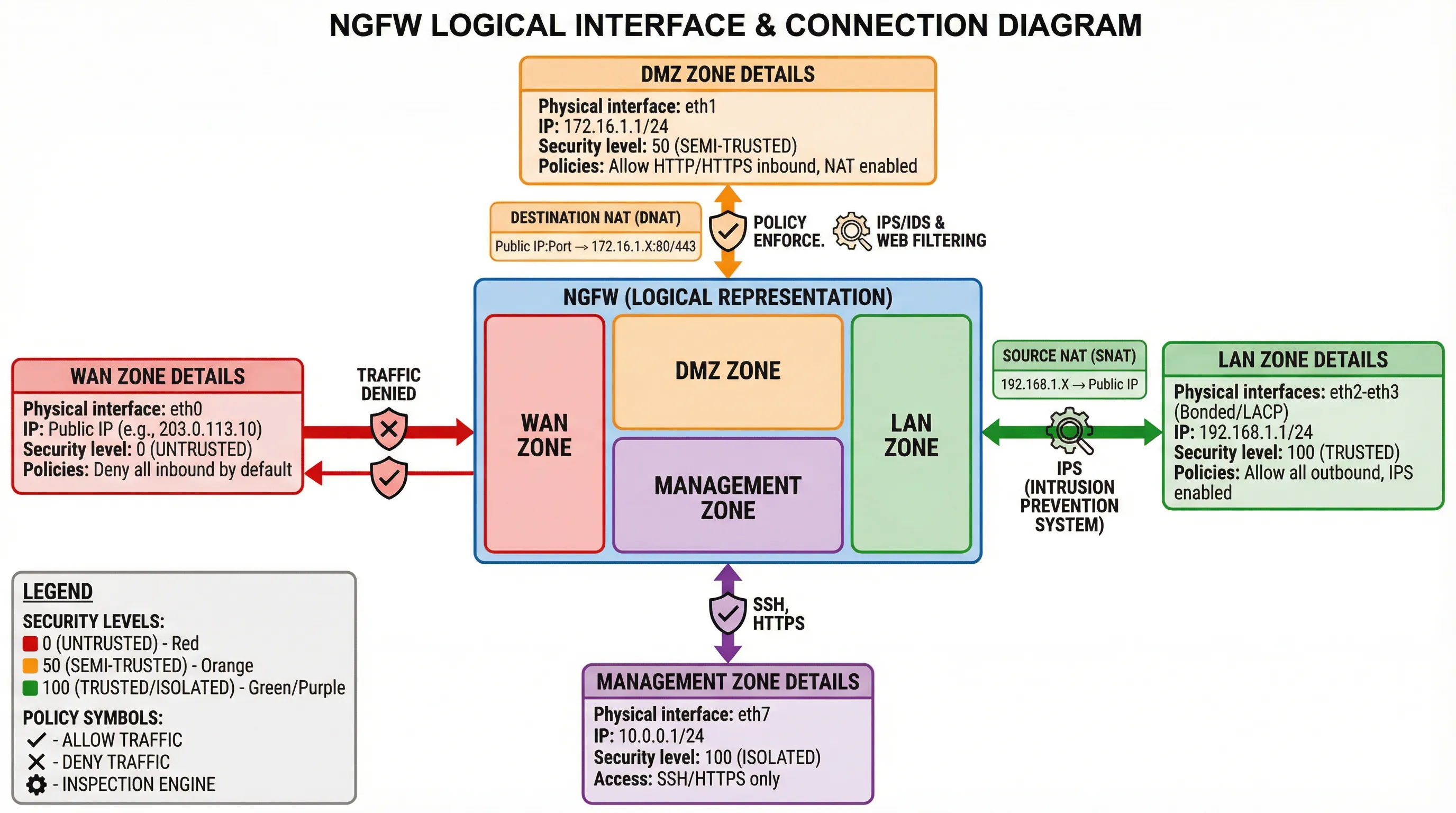
Security Zone Design
| Zone | Physical Interface | IP Addressing | Security Level | Default Policy |
|---|---|---|---|---|
| WAN Zone | eth0 | Public IP from ISP | 0 (Untrusted) | Deny all inbound, allow established |
| DMZ Zone | eth1 | 172.16.1.0/24 (Private) | 50 (Semi-trusted) | Allow specific services inbound, inspect all |
| LAN Zone | eth2-eth3 (Bonded) | 192.168.1.0/24 (Private) | 100 (Trusted) | Allow outbound, IPS enabled |
| Management Zone | eth7 | 10.0.0.0/24 (Isolated) | 100 (Isolated) | SSH/HTTPS only from admin IPs |
Interface Bonding and Aggregation
Link aggregation (LACP) combines multiple physical interfaces into a single logical interface for increased bandwidth and redundancy. Configure bonding for LAN interfaces to provide 2Gbps or higher throughput to core switches. Use active-active bonding for load balancing or active-passive for failover only. Ensure both firewall and connected switch support the same bonding protocol (typically IEEE 802.3ad LACP).
VLAN Tagging
VLAN tagging (802.1Q) allows a single physical interface to carry traffic for multiple logical networks. Create VLAN subinterfaces on trunk ports to segment traffic without requiring dedicated physical ports. Assign each VLAN to an appropriate security zone with corresponding policies. Use native VLAN carefully to avoid VLAN hopping attacks.
5.3 Endpoint Detection and Response (EDR) Selection
EDR solutions provide advanced endpoint protection beyond traditional antivirus, offering behavioral analysis, threat hunting, and automated response capabilities.
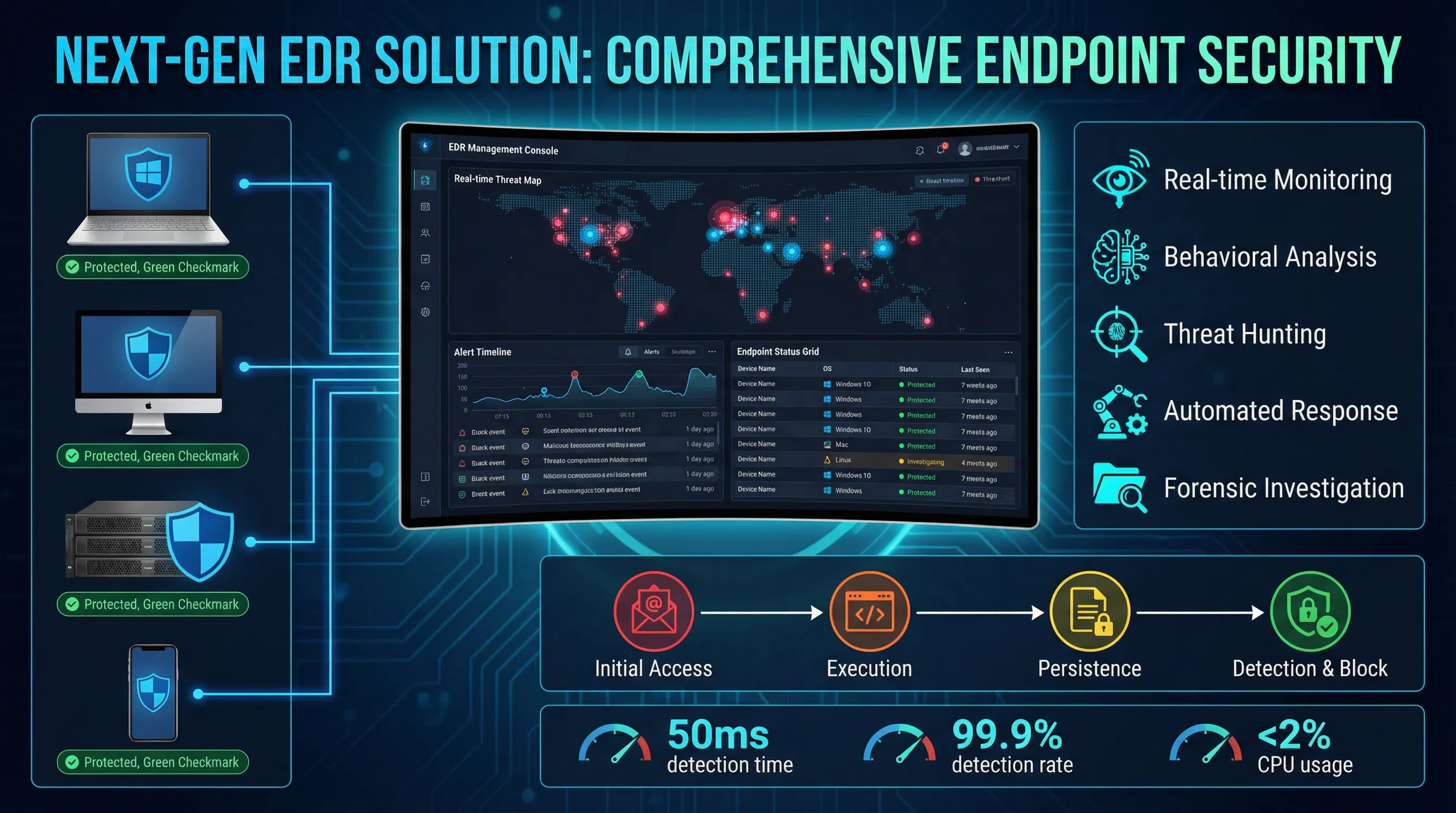
EDR Core Capabilities
| Capability | Description | Business Value |
|---|---|---|
| Real-time Monitoring | Continuous visibility into endpoint activities and processes | Early detection of suspicious behavior |
| Behavioral Analysis | Machine learning to identify anomalous patterns | Detect zero-day and fileless attacks |
| Threat Hunting | Proactive search for indicators of compromise | Discover hidden threats before damage occurs |
| Automated Response | Automatic isolation, quarantine, and remediation | Reduce response time from hours to seconds |
| Forensic Investigation | Detailed timeline and root cause analysis | Understand attack chain and prevent recurrence |
Platform Support Requirements
- Windows: Windows 10/11, Windows Server 2016/2019/2022
- macOS: macOS 11 (Big Sur) and later
- Linux: Major distributions (RHEL, Ubuntu, CentOS, SUSE)
- Mobile: iOS 14+ and Android 10+ for mobile endpoint protection
- Virtual: Support for VMware, Hyper-V, and cloud instances
Management and Deployment
Choose between cloud-managed, on-premise, or hybrid management models based on organizational requirements. Cloud management offers easier deployment and automatic updates but requires internet connectivity. On-premise management provides greater control and data sovereignty but requires dedicated infrastructure. Hybrid models balance both approaches. Evaluate agent deployment methods including manual installation, Group Policy (Windows), MDM (mobile), and configuration management tools.
Performance Impact
EDR agents consume system resources including CPU, memory, and disk I/O. Modern EDR solutions typically use less than 2% CPU and 200MB RAM on average workloads. Evaluate performance impact during POC testing with representative workloads. Consider agent update mechanisms and scheduling to minimize disruption during business hours.
5.4 Product Comparison and Recommendation Matrix
The following matrix provides guidance for selecting security products based on organization size, budget, and requirements.
NGFW Product Tiers
| Tier | Organization Size | Throughput | Price Range | Recommended Vendors |
|---|---|---|---|---|
| Entry | 50-100 users | 500Mbps - 1Gbps | $3,000 - $8,000 | Fortinet FortiGate 60F, Sophos XG 106 |
| Mid-range | 100-500 users | 1Gbps - 5Gbps | $10,000 - $30,000 | Palo Alto PA-440, Fortinet FortiGate 200F |
| Enterprise | 500-2000 users | 5Gbps - 20Gbps | $40,000 - $100,000 | Palo Alto PA-3220, Cisco Firepower 2130 |
| Data Center | 2000+ users | 20Gbps - 100Gbps+ | $150,000+ | Palo Alto PA-5450, Fortinet FortiGate 3600E |
EDR Product Comparison
| Product | Strengths | Best For | Price per Endpoint/Year |
|---|---|---|---|
| CrowdStrike Falcon | Cloud-native, lightweight agent, threat intelligence | Organizations prioritizing cloud management | $50 - $100 |
| Microsoft Defender for Endpoint | Deep Windows integration, included with E5 licenses | Microsoft-centric environments | $10 - $15 (or included) |
| SentinelOne | AI-driven detection, autonomous response | Organizations requiring advanced automation | $40 - $80 |
| Carbon Black | Strong forensics, behavioral analysis | Incident response and threat hunting teams | $45 - $90 |